What Is a Vector Database? (And Does Your Business Need One?)
Vector databases are the infrastructure that makes AI search and RAG systems work. Here's the plain-English explanation — and a clear answer to whether your business actually needs one, with a guide to Pinecone, Weaviate, and pgvector.
If you have been researching how to build an AI system that can answer questions from your company's documents, you have almost certainly encountered the term "vector database." It appears in every RAG tutorial, every AI search guide, and most AI infrastructure discussions. The explanations usually assume you already know what a vector is.
This guide explains vector databases from first principles — what they are, why AI systems need them, how they work, and which one you should use.
Kovil AI · AI Engineering
We build RAG systems and AI search applications powered by the right vector infrastructure.
What Is a Vector?
Before a vector database makes sense, you need to understand what a vector is in this context. A vector is a list of numbers that represents the meaning of a piece of text. When you feed a sentence like "our return policy allows 30 days" into an embedding model, it produces a list of several hundred or thousand numbers. A similar sentence — "customers can request refunds within a month" — produces a different list of numbers, but mathematically they are very close together in the high-dimensional space those numbers define.
This mathematical closeness is what captures semantic similarity. Words that mean the same thing, sentences that express the same idea, documents that cover the same topic — their vectors are close together. Words and sentences that are unrelated are far apart.
Traditional databases have no concept of meaning. They only find exact matches. If you store "return policy" and search for "refund terms," a traditional database returns nothing. A vector database returns the right result because both phrases land close together in vector space.
What Is a Vector Database?
A vector database is a storage system specifically designed to store, index, and efficiently search vectors. The key operation it provides is nearest-neighbour search: given a query vector (the vectorised form of a user's question), find the stored vectors that are closest to it.
This is computationally different from traditional database lookups. Searching through millions of high-dimensional vectors for the closest matches requires specialised indexing algorithms — most commonly HNSW (Hierarchical Navigable Small World) or IVF (Inverted File Index) — that make the search fast enough to return results in milliseconds rather than seconds.
Why Do AI Applications Need Vector Databases?
Vector databases are the enabling infrastructure for three major AI application patterns:
Retrieval-Augmented Generation (RAG). The most common pattern. Your documents are vectorised and stored. When a user asks a question, the most relevant document chunks are retrieved and passed to the LLM as context. The model answers the question using that retrieved context rather than relying on training data alone. Without a vector database, there is no efficient way to find the relevant documents in a large corpus.
Semantic search. Search that understands meaning rather than matching keywords. A user searching "something for headaches" in a pharmaceutical catalogue should surface paracetamol and ibuprofen, even if neither product description uses that phrase. Vector search makes this possible.
Recommendation systems. Finding content, products, or documents that are similar to something a user has already engaged with. Vector similarity is a natural fit for content-based recommendation.
How Does a Vector Database Work? Step by Step
Here is the full pipeline, from raw documents to a working AI search system:
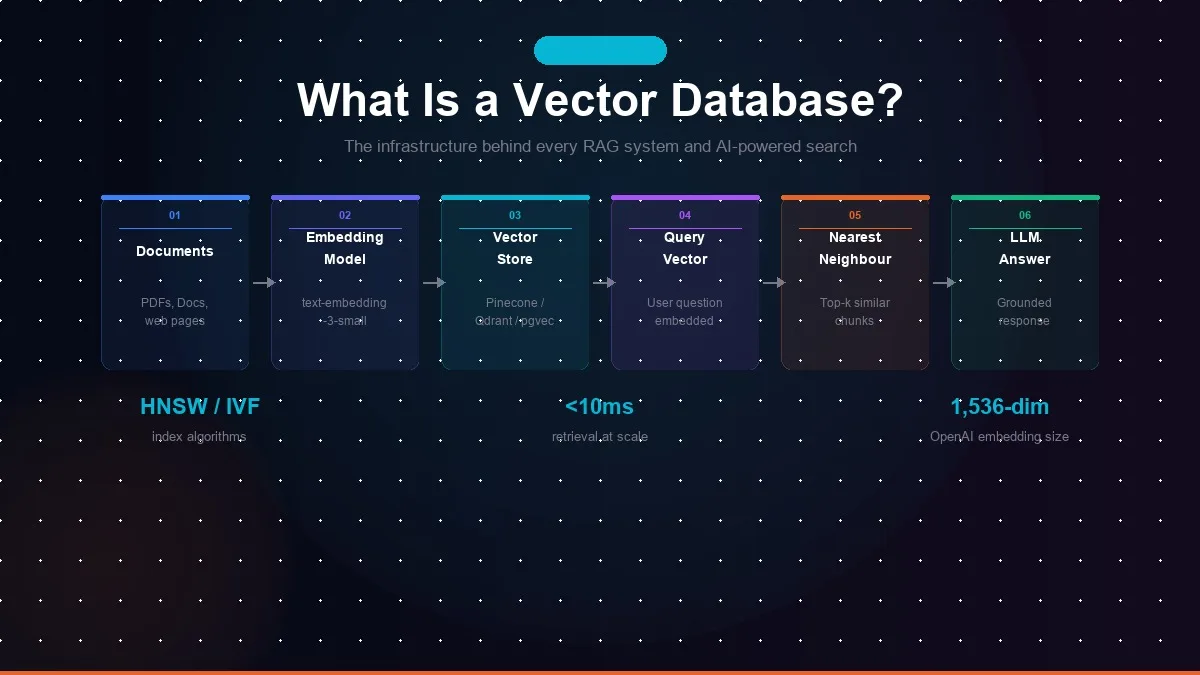
- Chunk your documents. Split your source documents into smaller pieces — typically 200 to 500 tokens each, with some overlap between chunks to avoid cutting context at boundaries.
- Embed each chunk. Pass each chunk through an embedding model (such as OpenAI's text-embedding-3-small or an open-source model like nomic-embed-text). The model returns a vector — a list of numbers — for each chunk.
- Store the vectors. Write each chunk's vector to the vector database, along with the original text and any metadata (source document, page number, date) you want to filter on later.
- Embed the user's query. When a user asks a question, pass their question through the same embedding model to get a query vector.
- Search for nearest neighbours. The vector database finds the stored vectors closest to the query vector using its index, and returns the top-k most similar chunks.
- Pass results to the LLM. The retrieved chunks are included in the prompt alongside the user's question. The LLM generates an answer grounded in the retrieved context.
Which Vector Database Should You Use?
The right choice depends on your scale, infrastructure preferences, and existing tech stack:
| Database | Best For | Managed? | Notes |
|---|---|---|---|
| Pinecone | Easiest managed option | Yes (fully managed) | No infrastructure to manage; scales automatically; pricier at high volume |
| Qdrant | Production performance | Self-hosted or managed | Fastest and most memory-efficient; strong filtering; Rust-based |
| Weaviate | Complex multi-modal use cases | Self-hosted or managed | Highly flexible; built-in modules for different embedding models |
| pgvector | Existing PostgreSQL users | Depends on Postgres host | No new infrastructure if you already use Postgres; slower at very large scale |
| Chroma | Prototyping & development | Self-hosted | Easiest to set up locally; not recommended for production at scale |
Do You Actually Need a Dedicated Vector Database?
Not always. The decision depends on your document volume and query load:
You need a dedicated vector database when: your corpus exceeds 50,000 documents, you need sub-second retrieval under high concurrent query load, you need advanced filtering (by date, category, author) alongside semantic search, or your use case is customer-facing and reliability is critical.
You may not need one when: you have fewer than 10,000 documents (pgvector in an existing Postgres instance handles this well), your application is internal with low query volume, or you are still in prototyping and want to defer infrastructure decisions.
The Embedding Model Matters As Much As the Database
The quality of your vector search depends as much on your embedding model as on your vector database. A better embedding model produces vectors that more accurately capture semantic meaning, leading to more relevant retrieval results.
OpenAI's text-embedding-3-small (1,536 dimensions, $0.02 per million tokens) is a strong default for most use cases. For higher accuracy on complex technical content, text-embedding-3-large (3,072 dimensions, $0.13 per million tokens) improves retrieval quality at higher cost. Open-source alternatives like nomic-embed-text are competitive on quality at zero inference cost when self-hosted.
Matching your chunk size, embedding model, and retrieval strategy to your specific content type — technical documentation, customer support history, legal contracts, product catalogue — is where production RAG systems win or lose on accuracy.
If you are building a RAG system, AI-powered search, or any application that needs to retrieve relevant information from a large document corpus, our Managed AI Engineer engagement includes vector database design as part of the architecture scope. Our engineers have built retrieval pipelines across Pinecone, Qdrant, and pgvector in production. Get in touch and we will scope the right approach for your use case.
Related Services
Frequently Asked Questions
What is a vector database in simple terms?
A vector database stores information as mathematical representations of meaning called vectors, and allows you to search for conceptually similar content rather than exact keyword matches. When you ask an AI system 'what is our return policy?' it finds the relevant documentation even if the document uses the words 'refund terms' rather than 'return policy' — because the vector representations of both phrases are mathematically close. Traditional databases can't do this.
Do I need a vector database for my AI application?
You need a vector database if you are building a RAG system (any AI that answers questions from your documents), a semantic search feature, or a recommendation engine based on content similarity. You do not need a vector database if your application only calls an LLM directly without retrieving context from external documents, or if you have fewer than a few thousand documents and can use simpler in-memory approaches.
What is the best vector database in 2026?
For production applications: Qdrant is the fastest and most memory-efficient fully open-source option. Pinecone is the easiest managed option for teams that want zero infrastructure management. If you already use PostgreSQL, pgvector adds vector search with no additional infrastructure. Weaviate is the best choice for complex multi-modal use cases. For prototyping and development, Chroma is the simplest to set up.
How does a vector database work with RAG?
In a RAG pipeline, your documents are split into chunks and converted to vectors by an embedding model. Those vectors are stored in the vector database. When a user asks a question, the question is also converted to a vector, and the database finds the document chunks whose vectors are mathematically closest to the question vector — meaning semantically similar content. Those chunks are passed to the LLM along with the user's question, giving the model relevant context to answer accurately.
What is the difference between a vector database and a regular database?
A traditional database finds exact matches — it searches by specific values, IDs, or keywords. A vector database finds semantically similar content — it searches by meaning, not exact text. Traditional databases use indexes like B-trees for fast exact lookups. Vector databases use approximate nearest-neighbour algorithms like HNSW or IVF to find the most similar vectors in high-dimensional space. Both are good at what they do; they solve different retrieval problems.
Keep reading
Kovil AI · AI Engineering
Ready to build a RAG system or AI-powered search for your business?
We design and build vector database pipelines, embedding workflows, and RAG systems in production — connected to your documents, your data, and your existing stack.