n8n vs Power Automate vs Zapier vs Make (2026 Comparison)
Which workflow automation tool is best for your team? Compare pricing, custom logic, and features for n8n, Zapier, Make, and Power Automate.
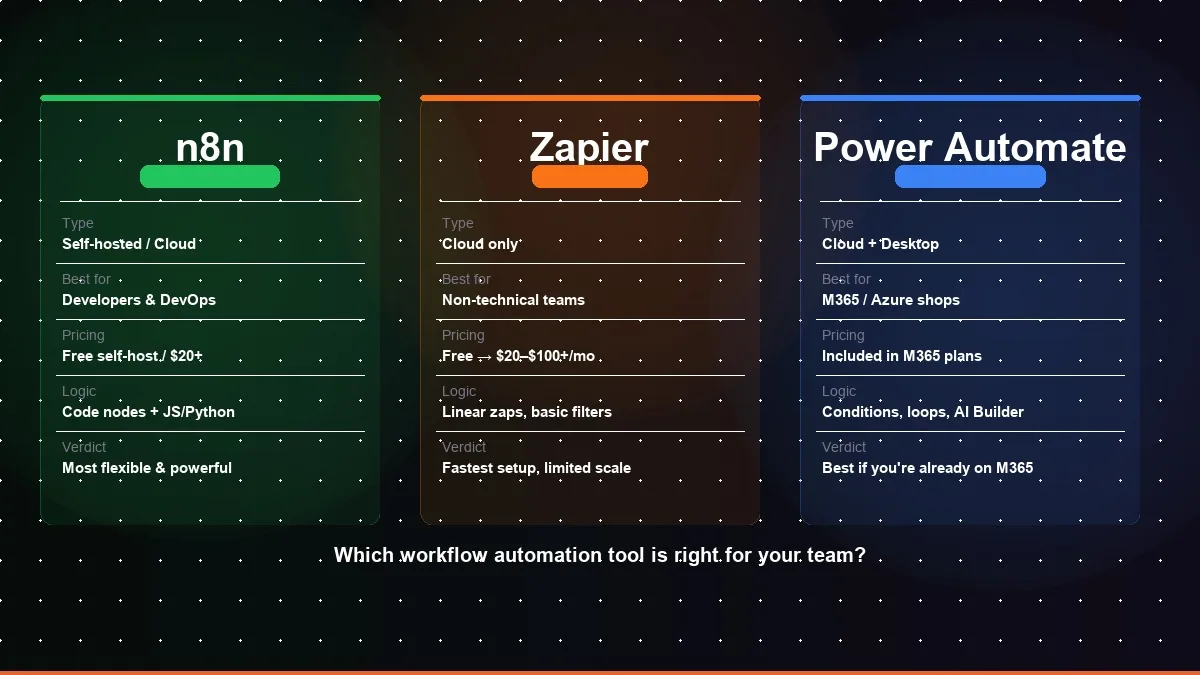
If you've started looking into workflow automation, you've probably encountered three names repeatedly: Zapier, n8n, and Microsoft Power Automate. All three can connect your tools and automate repetitive tasks. But they're built for fundamentally different users with fundamentally different needs, and choosing the wrong one can cost you months of rework.
This guide cuts through the marketing and gives you a practical, honest comparison based on real-world implementation experience across dozens of automation projects.
Quick Verdict
- Zapier — best for non-technical teams who need simple automations with popular apps, fast.
- n8n — best for technical teams needing complex workflows with custom logic, on a budget, with full data control.
- Power Automate — best for companies already on Microsoft 365 (Teams, SharePoint, Dynamics).
- Make — best for teams wanting more power than Zapier without the developer overhead of n8n.
If none of those descriptions fit neatly, read on. The reality has more nuance.
Hire Automation Experts
Need vetted experts to deploy and manage your automation workflows? Kovil AI connects you with Tier-1 specialists in 48 hours with a 2-week risk-free trial.
Zapier: The Accessible Standard
What it is
Zapier is the most widely adopted automation platform in the world, with integrations for 6,000+ apps and a no-code interface that non-technical users can learn in a day. It was built for the "glue layer" between SaaS products, connecting your CRM to your email tool, your form submissions to your spreadsheet, your Stripe events to your Slack channel.
Strengths
Breadth of integrations. 6,000+ apps with robust, maintained connectors. If you're using a mainstream SaaS tool, Zapier almost certainly has an integration for it.
Accessibility. The interface is genuinely intuitive. A non-technical marketer or ops manager can set up meaningful automations in an afternoon. The learning curve is as shallow as it gets.
Reliability and support. Zapier has invested heavily in uptime, error handling, and documentation. For business-critical automations, the managed infrastructure is a genuine advantage.
Speed to value. For straightforward use cases, Zapier is the fastest path from problem to automation. A simple two-step Zap can be live in minutes.
Weaknesses
Cost at scale. Zapier's pricing scales with task volume, and it gets expensive quickly for high-volume workflows. Companies running millions of tasks monthly often find Zapier's costs prohibitive, especially when cheaper alternatives can handle the same volume.
Limited logic. Multi-branch conditional logic, loops, and complex data transformations are clunky in Zapier. What's a 5-minute workflow in n8n can require creative workarounds in Zapier.
Data handling limitations. Zapier's data transformation capabilities are limited. Complex JSON manipulation, batch operations, and custom data structures require workarounds or code steps (available in higher-tier plans).
No self-hosting. Your automation logic and data flow through Zapier's servers. For companies with strict data residency or security requirements, this is a dealbreaker.
Pricing
Free tier: 100 tasks/month, single-step Zaps. Professional starts at ~$20/month for 750 tasks. Team plans start at ~$69/month. Enterprise pricing is negotiated. Costs escalate sharply with task volume, this is the platform's biggest long-term risk for growing companies.
Best for
Small to medium businesses that need quick automations between popular SaaS tools. Non-technical teams. Companies where time-to-automation matters more than per-task cost. Organisations that don't have sensitive data flowing through automation pipelines.
n8n: The Developer's Choice
What it is
n8n (pronounced "n-eight-n") is an open-source workflow automation platform that has rapidly grown into a serious alternative to Zapier for technical teams. It can be self-hosted (free, unlimited tasks) or used as a managed cloud service. Its node-based visual interface supports complex logic, custom code execution, and extensive data manipulation.
Strengths
Unlimited tasks at low cost. Self-hosted n8n runs on your own infrastructure with no per-task pricing. For companies running hundreds of thousands or millions of automations, the cost difference versus Zapier can be an order of magnitude.
Full data control. Self-hosted means your data never leaves your infrastructure. For healthcare, financial services, legal, and other regulated industries, this changes the compliance calculus entirely.
Complex workflow support. n8n handles multi-branch logic, loops, sub-workflows, dynamic expressions, and complex data transformations elegantly. Workflows that would require 10 Zaps in Zapier are a single workflow in n8n.
Code execution. Built-in code nodes (JavaScript and Python) let developers execute custom logic inside workflows without the restrictions of no-code tools. This makes n8n extensible to almost any use case.
Active development and community. n8n has grown rapidly, with regular releases, a strong community, and an expanding library of built-in integrations and community templates.
Weaknesses
Setup overhead. Self-hosted n8n requires DevOps knowledge to deploy, maintain, and secure. You're responsible for infrastructure, backups, updates, and uptime. The cloud version removes this but adds cost.
Steeper learning curve. n8n is more powerful than Zapier, and with that power comes complexity. Non-technical users will struggle. It's a developer tool, and it works best with at least one developer on the team who can build and maintain workflows.
Narrower integration library. n8n has 400+ native integrations, comprehensive, but nowhere near Zapier's 6,000+. For obscure apps, you'll need to use HTTP request nodes to build custom integrations.
Less polished error handling. n8n's error handling and retry logic requires more manual configuration than Zapier's. Production workflows need explicit error handling built in.
Pricing
Self-hosted: free and open-source (infrastructure costs only). Cloud Starter: $24/month for 2,500 executions. Pro: $60/month for 10,000 executions. Enterprise: custom pricing with advanced features and support.
Best for
Technical teams comfortable with infrastructure management. Companies with high automation volume where per-task pricing is prohibitive. Regulated industries requiring data residency control. Use cases requiring complex logic, custom code, or deep data transformation. Companies building proprietary automation workflows they want to fully own.
Microsoft Power Automate: The Enterprise Default
What it is
Power Automate (formerly Flow) is Microsoft's automation platform, deeply integrated with the Microsoft 365 ecosystem. If your company runs on Teams, SharePoint, Outlook, Dynamics, or Azure, Power Automate has a natural home in your stack. It's available as part of most Microsoft 365 business subscriptions.
Strengths
Deep Microsoft integration. No other platform handles Microsoft products as well as Power Automate. SharePoint triggers, Teams notifications, Excel operations, Outlook flows, Dynamics CRM integrations, these work seamlessly and reliably.
Included with M365. For companies already paying for Microsoft 365, Power Automate is already available at no additional cost for a significant range of use cases. This changes the ROI calculation dramatically.
Enterprise governance. Power Automate includes centralised management, data loss prevention policies, audit logs, and access controls designed for enterprise IT departments. For large organisations with strict governance requirements, this is a meaningful advantage.
RPA capabilities. Power Automate Desktop enables robotic process automation, automating interactions with desktop applications, web browsers, and legacy systems that don't have APIs. This opens up automation possibilities unavailable on Zapier or n8n.
Weaknesses
Complex licensing. Microsoft's licensing structure is notoriously complicated. The "included" functionality has significant limitations, and production-grade workflows often require premium connectors or per-user/per-flow add-ons that add up quickly.
Steep learning curve. Power Automate is not intuitive. The interface has improved but still lags behind Zapier in accessibility. Non-technical users often struggle, and the documentation, while extensive, can be hard to navigate.
Performance can be variable. Complex Power Automate flows can be slow, execution times that would be milliseconds in a custom integration can take seconds in Power Automate, which matters for user-facing workflows.
Outside the Microsoft ecosystem, it weakens significantly. Power Automate's connectors for non-Microsoft products are often less robust than Zapier's. For companies with diverse SaaS stacks, the integration gaps can be frustrating.
Pricing
Included in most M365 Business and Enterprise plans (with limitations). Power Automate per-user plan: $15/user/month. Per-flow plan: $100/flow/month (5 flows minimum). Premium connectors and RPA features add additional cost.
Best for
Companies already on Microsoft 365 who want to maximise their existing investment. Enterprises with strong IT governance requirements. Use cases heavily involving Microsoft products (SharePoint, Teams, Dynamics, Excel). Automation of legacy desktop applications requiring RPA capabilities.
Make (Integromat): The Visual Builder's Choice
What it is
Make (formerly Integromat) is a visual automation platform that sits between Zapier's simplicity and n8n's power. Its scenario-based builder uses a drag-and-drop canvas that makes complex, multi-path workflows much easier to visualize and build than Zapier's linear model, without requiring the developer expertise that n8n demands.
Strengths
Visual clarity. Make's canvas-based interface is the most visually intuitive of the four platforms for complex workflows. Multiple branches, conditional paths, and loops are easy to see and follow at a glance.
Strong data transformation. Make handles JSON transformation, array manipulation, and complex data mapping significantly better than Zapier, without requiring you to write code like in n8n.
Competitive pricing. Make's pricing is based on operations (individual steps within a scenario) rather than per-task like Zapier, which makes it meaningfully cheaper for multi-step workflows at moderate volumes.
1,000+ integrations. Make's connector library is between Zapier's 6,000 and n8n's 400, covering all mainstream SaaS tools with solid, regularly-maintained connectors.
Weaknesses
No self-hosting. Like Zapier, Make is fully cloud-hosted, your data flows through Make's servers. No data residency control for regulated industries.
Steeper curve than Zapier. Make is more powerful than Zapier, but that power comes with more complexity. Non-technical users may find it harder to get started than Zapier.
Slower execution. Make scenarios can execute more slowly than equivalent n8n workflows, which matters for latency-sensitive, user-facing automations.
Pricing
Free tier: 1,000 operations/month. Core: $10.59/month for 10,000 operations. Pro: $18.82/month for 10,000 operations with advanced features. Teams and Enterprise pricing available.
Best for
Teams that want more power than Zapier without the developer overhead of n8n. Businesses with moderate automation complexity, multiple branches, data transformations, conditional logic, that need a visual builder. Budget-conscious teams replacing Zapier at moderate volume.
Pricing Comparison: n8n vs Zapier vs Power Automate vs Make
| Plan | Zapier | n8n | Power Automate | Make |
|---|---|---|---|---|
| Free tier | 100 tasks/mo | Unlimited (self-hosted) | Included in M365 | 1,000 ops/mo |
| Paid (entry) | ~$20/mo · 750 tasks | $24/mo · 2,500 executions | $15/user/mo | $10.59/mo · 10,000 ops |
| Mid tier | ~$69/mo · Teams | $60/mo · 10,000 executions | $100/flow/mo (premium) | $18.82/mo · advanced features |
| Enterprise | Custom pricing | Custom pricing + support | Negotiated via Microsoft | Custom pricing |
n8n vs Power Automate: The Difference Explained
The difference between n8n and Power Automate is bigger than it first appears. Both handle complex workflows and serve enterprise clients, but they are built for fundamentally different ecosystems and teams. n8n is an open-source, developer-first platform you can self-host for full data control and near-zero per-task cost. Power Automate is Microsoft's managed automation platform, built specifically for organisations running on Microsoft 365 (Teams, SharePoint, Dynamics) — and often already included in their M365 licence. Here is the direct, honest comparison.
| Factor | n8n | Power Automate |
|---|---|---|
| Best for | Technical teams needing complex, custom logic | Microsoft 365 shops (Teams, SharePoint, Dynamics) |
| Cost model | Free if self-hosted, infrastructure costs only (~$10–50/mo) | Included in M365 plans, premium connectors extra |
| Setup complexity | Medium, needs a developer; self-hosting requires DevOps | Medium-high, complex licensing; steep learning curve |
| Data control | ✓ Full control, self-host for data residency requirements | Enterprise governance, but data flows through Microsoft cloud |
| Custom logic / code | ✓ Native JS and Python code nodes | Limited, expressions and basic conditions only |
| Non-Microsoft integrations | ✓ 400+ native + extensible via HTTP | Weaker, connectors less robust outside Microsoft ecosystem |
| RPA (desktop automation) | ✗ Not supported | ✓ Power Automate Desktop, strong RPA capabilities |
| Scale economics | ✓ No per-task pricing, costs flat as volume grows | Premium flow costs escalate, $100/flow/mo for advanced |
The verdict: Choose n8n if you have a developer on the team, need custom code in workflows, or run high task volumes where per-flow pricing would hurt. Choose Power Automate if you're already deep in the Microsoft 365 ecosystem, it integrates better with SharePoint, Teams, and Dynamics than any other tool, and you're likely already paying for it.
If your company has both heavy Microsoft usage and complex custom automation needs, the winning architecture is often Power Automate for Microsoft-specific triggers and n8n for everything else.
Head-to-Head: Key Decision Factors
Ease of use
Zapier wins for accessibility, non-technical users can be productive immediately. Power Automate is the hardest to learn. n8n sits in the middle, accessible to developers but challenging for non-technical users.
Cost at scale
n8n self-hosted wins clearly for high-volume use cases. Zapier becomes expensive quickly. Power Automate is most cost-effective if you're already paying for M365.
Flexibility and power
n8n wins for complex workflows with custom logic. Zapier works well for simple linear automations. Power Automate is powerful within the Microsoft ecosystem but limited outside it.
Data control and security
n8n (self-hosted) wins for data residency requirements. Power Automate offers strong enterprise governance. Zapier's fully-managed model offers the least control.
Integration breadth
Zapier wins with 6,000+ integrations. n8n has 400+ with the ability to extend via HTTP. Power Automate has ~1,000 connectors but excels only within the Microsoft ecosystem.
Which Tool Should You Use? Decision Guide
Use n8n when:
- You have a developer on the team
- Task volume makes Zapier cost-prohibitive
- You need custom code inside workflows
- Data residency or compliance requires self-hosting
Use Zapier when:
- Your team is non-technical
- You need fast setup with mainstream SaaS tools
- Automation volume is low to moderate
- Speed to value matters more than cost-per-task
Use Power Automate when:
- Your company runs on Microsoft 365
- You need SharePoint, Teams, or Dynamics integration
- You require enterprise governance and audit logs
- You need desktop RPA for legacy systems
Use Make when:
- You want a visual canvas builder
- Your workflows have multiple branches and conditions
- You're outgrowing Zapier but can't justify a developer
- Budget is a constraint at moderate volumes
When to Use Multiple Platforms
Real-world automation architectures often use more than one tool. A common pattern: use Zapier for simple, user-facing automations where non-technical team members need to create and manage their own workflows, while running n8n for complex, high-volume backend processes that need custom logic and data control.
Power Automate often coexists with Zapier or n8n in Microsoft-heavy enterprises, handling all Microsoft-related automations while the other platform covers non-Microsoft integrations.
The overhead of maintaining two platforms is real, but for companies at a certain scale, it's often the right trade-off.
The Role of an Integration Partner
Choosing the right platform is half the battle. Building reliable, production-grade automations that handle errors gracefully, scale under load, and are maintainable by someone other than the original builder requires experience that most internal teams are still developing.
An experienced automation partner has built hundreds of workflows across all three platforms and knows where each one has hidden gotchas. They can design systems that perform reliably in production, not just in demos, and document them well enough that your team can own them long-term.
The Bottom Line
There's no universally correct answer to the Zapier vs n8n vs Power Automate question. The right choice depends on your team's technical maturity, your data sensitivity requirements, your volume, your budget, and your existing tool stack.
What's clear is that all three platforms can deliver significant operational leverage when applied to the right problems by people who know them well. The mistake to avoid is choosing a platform based on name recognition or a free trial, choose based on a clear-eyed assessment of your requirements and the long-term cost of ownership.
If you're unsure which platform is right for your use case, or if you need to move quickly from decision to deployed automation, working with a Managed AI Engineer who has production experience across all four platforms can save significant time and prevent costly rework. For a scoped automation build with fixed deliverables, our Outcome-Based AI Project engagement gets you from decision to deployed automation in weeks.
Related Services
Frequently Asked Questions
What is the main difference between n8n, Zapier, and Power Automate?
Zapier is the most accessible option, a no-code platform with 6,000+ integrations, ideal for non-technical teams building simple automations quickly. n8n is an open-source, developer-focused platform that handles complex workflows with custom logic and can be self-hosted for full data control at near-zero per-task cost. Power Automate is Microsoft's automation platform, deeply integrated with the Microsoft 365 ecosystem and best suited for companies already running on Teams, SharePoint, and Dynamics.
Is n8n really free?
Self-hosted n8n is free and open-source with no per-task pricing, you only pay for your own infrastructure (typically $10–$50/month on a basic VPS). The cloud-hosted version starts at $24/month for 2,500 executions. For companies running high automation volumes, self-hosted n8n can be an order of magnitude cheaper than Zapier, which charges per task and escalates quickly at scale.
Which automation tool is best for non-technical teams?
Zapier is the clear winner for non-technical teams. Its interface is genuinely intuitive, a non-technical marketer or ops manager can build meaningful automations in an afternoon with no coding required. Power Automate has a steeper learning curve and n8n requires developer involvement. If your team doesn't have technical resources to build and maintain workflows, Zapier's speed-to-value and managed infrastructure are worth the higher per-task cost.
Can I use multiple automation platforms at the same time?
Yes, and many companies do. A common architecture uses Zapier for simple, user-managed automations where non-technical staff create their own workflows, while n8n handles complex, high-volume backend processes that need custom logic and data control. Power Automate often coexists with either in Microsoft-heavy enterprises, handling all Microsoft-related automations while the other platform covers the rest.
How do I decide between Zapier and n8n for my business?
Choose Zapier if: your team is non-technical, you need quick setup with popular SaaS apps, and volume is low enough that per-task pricing stays reasonable. Choose n8n if: you have a developer on the team, you need complex conditional logic or custom code in workflows, you're running high task volumes where Zapier would be expensive, or you have data residency requirements that prevent sending data through third-party servers.
What is the difference between n8n and Power Automate?
The core difference between n8n and Power Automate is ecosystem fit. n8n is an open-source, developer-focused platform that can be self-hosted for full data residency control with no per-task pricing — it handles complex workflows with custom JavaScript or Python code and connects to any API via HTTP nodes. Power Automate is Microsoft's managed automation platform, purpose-built for Microsoft 365 environments (Teams, SharePoint, Dynamics, Excel, Outlook), often included in existing M365 licences, with strong enterprise governance and RPA capabilities for legacy desktop automation. Choose n8n for technical teams needing custom logic, data control, and cost efficiency at scale. Choose Power Automate if your workflows live inside the Microsoft ecosystem.
Kovil AI · Workflow Automation
Looking to automate workflows inside your business?
We help businesses replace hours of manual, repetitive work with AI-powered automations — whether that's connecting your tools with n8n, Make, or building something fully custom. Let's figure out what's possible for your team.